Toggle Geometry (TG)
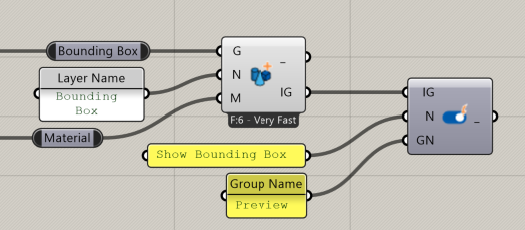
Show or hide geometry in the InForm interface using a toggle switch controlled by the user.
📸 Component Screenshot
📂 Component Location
Tab: 2. Geometry
📝 Description
The Toggle Geometry (TG) component creates a visibility switch for InForm geometry. When toggled, the referenced geometry layer is shown or hidden in the InForm viewer. If no toggle name or group name is provided, the component automatically uses the first layer name.
📁 Example File
🔌 Inputs
| Abbrev. | Full Name | Type | Description |
|---|---|---|---|
| IG | InForm Geometry | InForm data | Geometry passed from a Geometry Layer (GL) component, to be controlled by the toggle. |
| N | Toggle Name | Text | Label displayed next to the toggle. Defaults to the first layer name if empty. |
| GN | Group Name | Text | Group name used by InForm to organize toggles. Defaults to the first layer name if empty. |
🔄 Outputs
| Abbrev. | Full Name | Type | Description | Suggested Connections |
|---|---|---|---|---|
| - | – | JSON | Internal data for InForm. Do not use or connect this output. | None — leave unconnected. |